
Export
BarePDF exports a single format: PDF. Your in-progress edits (annotations and page order) are saved automatically inside your browser, so there is no separate project file to keep track of — you just open a PDF and save a PDF.
Export as PDF
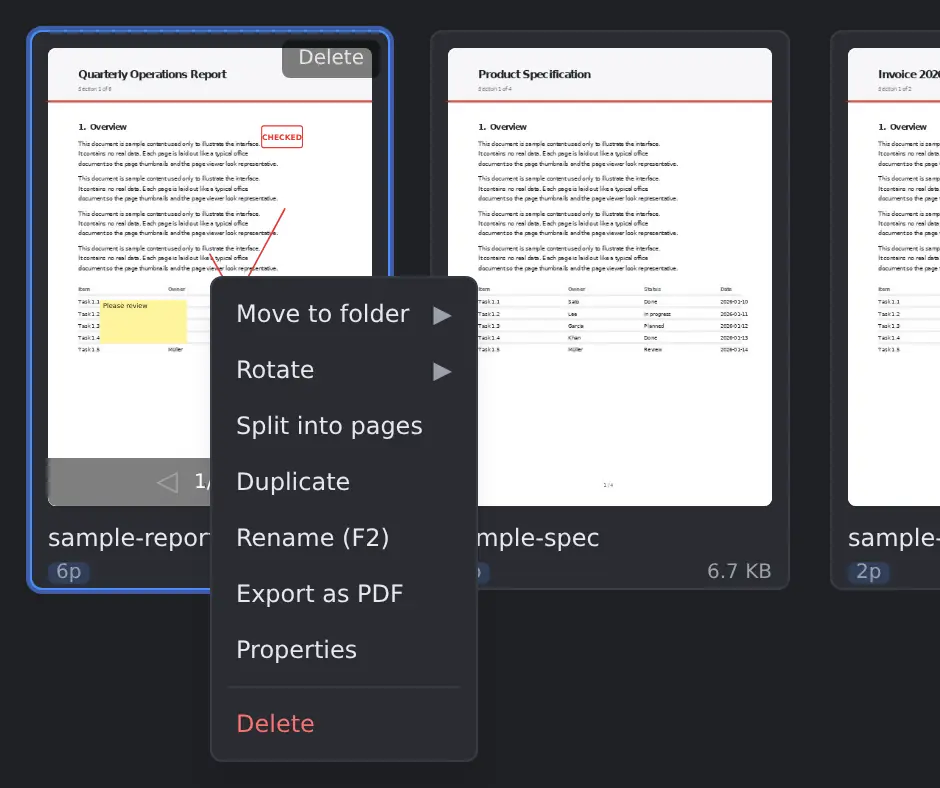
- In the Editor, choose Export to PDF.
- Or on the Desk, right-click a card → Export as PDF.
- The output reflects all reordering, rotation, and annotations.
- Annotations are written as individual PDF annotation objects (
/Ink,/FreeText,/Stamp) — in Acrobat and other viewers you can select, move, and delete them one by one, and edit the text inside sticky notes. The text on a placed stamp is not editable, and the pen's pressure-based thickness variation is not preserved.
Preservation of document information
BarePDF tries to preserve the input PDF's document-level information in the output as faithfully as possible.
- Editing a single PDF (reorder, delete pages, rotate, annotate): bookmarks/outlines, interactive form fields (AcroForm), metadata (title, author, creation date, etc.), XMP, tagged-PDF structure (accessibility), embedded file attachments, named destinations, and optional content (layers, OCG) are fully preserved.
- Merging multiple PDFs: the drop target's document information is preserved. Each page of the dragged source keeps its content (text, vector graphics, images, embedded fonts), but the dragged source's bookmarks/forms/metadata are lost. This is because a single output PDF cannot hold two document catalogs at once; BarePDF treats the drop target as the "main" document.
- Digital signatures: by PDF specification, any edit invalidates an existing signature. This is a general PDF constraint, not a BarePDF limitation.
- Annotations are written as individual PDF objects so they can be selected, moved, and deleted in Acrobat and other viewers. Sticky note text is editable after export. The text on a placed stamp is not editable (the appearance is baked in to preserve the look), and the pen's pressure-based thickness variation is dropped (PDF
/Inkhas one width per stroke).
Auto-save
- While editing, BarePDF auto-saves your edit state (annotations and page order) every 500 ms.
- It is restored automatically when you reopen the PDF from the Desk, and persists across browser sessions.
- This state lives only in your browser's IndexedDB; it is never uploaded anywhere.
- Because it is browser-local, clearing your browser data or switching to another device discards these edits. Export to PDF whenever you want a durable copy.
Browser quirks
- On Firefox, depending on your browser's PDF preference, the Save action may also open the file in the built-in viewer at the same time. This can be changed in
about:preferences→ General → Applications → PDF.